Google VPN Connects: Connection Wanes In and Out
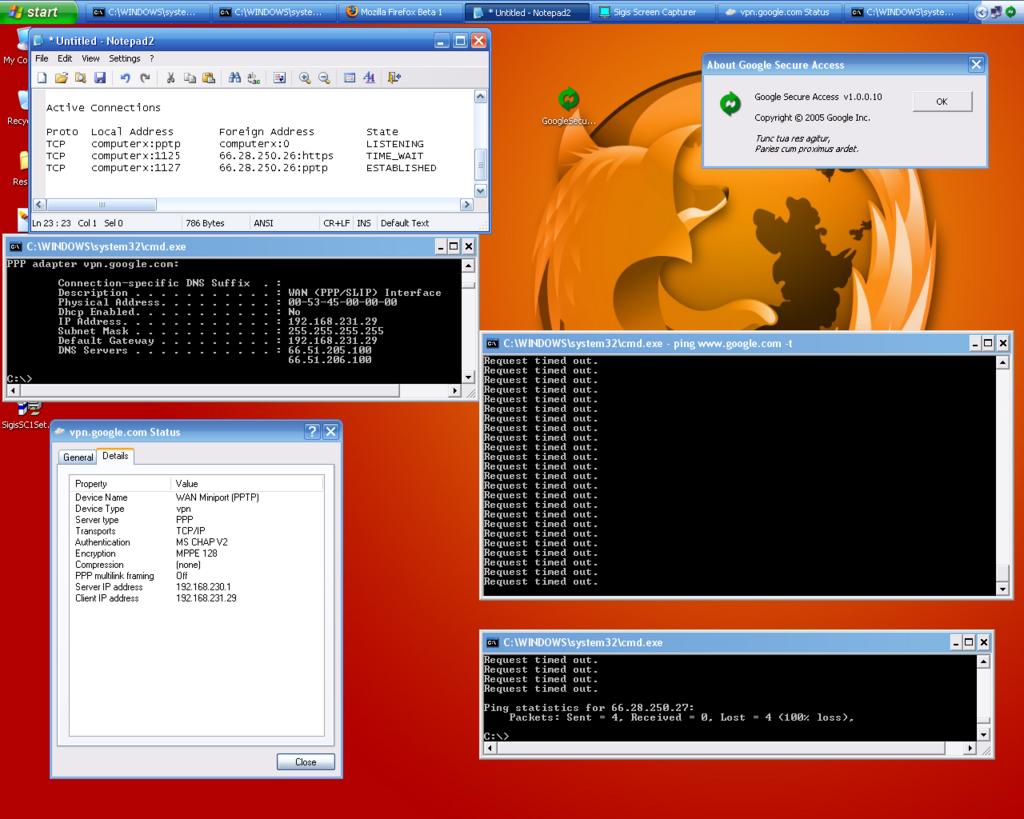
If you download and install the secure client from http://wifi.google.com/download.html, it will actually connect as you can see from the PPP configuration. The DNS resolving works fine, but TCP connections seem to drop on and off. Probably due to the high number of people that are trying to connect.
I wonder if they will try and hook this into:
Anyone dare to portscan for the proxy port?
PPP adapter vpn.google.com:

Connection-specific DNS Suffix  . :
Description . . . . . . . . . . . : WAN (PPP/SLIP) Interface
Physical Address. . . . . . . . . : 00-53-45-00-00-00
Dhcp Enabled. . . . . . . . . . . : No
IP Address. . . . . . . . . . . . : 192.168.241.6
Subnet Mask . . . . . . . . . . . : 255.255.255.255
Default Gateway . . . . . . . . . : 192.168.241.6
DNS Servers . . . . . . . . . . . : 66.51.205.100
                             66.51.206.100

C:\>netstat

Active Connections

Proto  Local Address       Foreign Address        State
TCP    computerx:pptp      computerx:0            LISTENING
TCP    computerx:1125      66.28.250.26:https     TIME_WAIT
TCP    computerx:1127      66.28.250.26:pptp      ESTABLISHED
I wonder if they will try and hook this into:
Pinging proxy.google.com [216.239.42.4] with 32 bytes of data:

Reply from 216.239.42.4: bytes=32 time=58ms TTL=49
Reply from 216.239.42.4: bytes=32 time=55ms TTL=49
Reply from 216.239.42.4: bytes=32 time=57ms TTL=49
Anyone dare to portscan for the proxy port?
posted by engfer at 9/20/2005 11:55:00 AM


0 Comments:
Post a Comment
<< Home